
Loading...

The fastest way to stop damaging your writing is to build a short, targeted checklist of your own recurring errors and run it on every draft before you publish. Most writers repeat the same five or six mistakes across everything they write. Find yours, fix them systematically, and your writing improves faster than any grammar course will deliver.
Start by scanning your last three documents for these high-impact errors:
Immediate edit step: search your draft for every comma followed by a pronoun or a subject noun — those are your most likely comma splices. Daily micro-practice: spend five minutes on one rule per day using Purdue OWL or Excelsior OWL. For borderline cases, the UW–Madison Writing Center's common errors handbook is the most practical desk reference available.
Avoiding common grammar mistakes comes down to three things: knowing your personal error patterns, running a prioritized checklist on every draft, and pairing automated tools with manual checks for the errors tools miss.
| Point | Details |
|---|---|
| Prioritize meaning errors first | Fix fragments, run-ons, and unclear pronouns before addressing punctuation or style. |
| Build a personal error log | Sample three recent documents, record recurring mistakes, and practice the rules behind your top two or three errors. |
| Use the editing checklist | Run meaning checks, then agreement and tense, then punctuation and word choice, in that order. |
| Don't rely on spell-checkers alone | Grammar checkers miss homonym errors; always scan manually for your/you're, its/it's, affect/effect, and similar pairs. |
| Rewrite broken sentences | When a sentence keeps failing despite patches, rewriting from scratch is faster and more reliable than repeated fixes. |
The list below covers every major category. Each entry gives you the error name, a wrong example, a corrected example, and a one-line fix you can apply during editing. Work through it once, then use it as a reference when something feels off.
1. Comma splice Two complete sentences joined by only a comma. ✗ I finished the report, it was due Friday. ✓ I finished the report. It was due Friday. (Or use a semicolon, or add "and.") Quick fix: If both sides of a comma can stand alone as sentences, replace the comma with a period or semicolon.
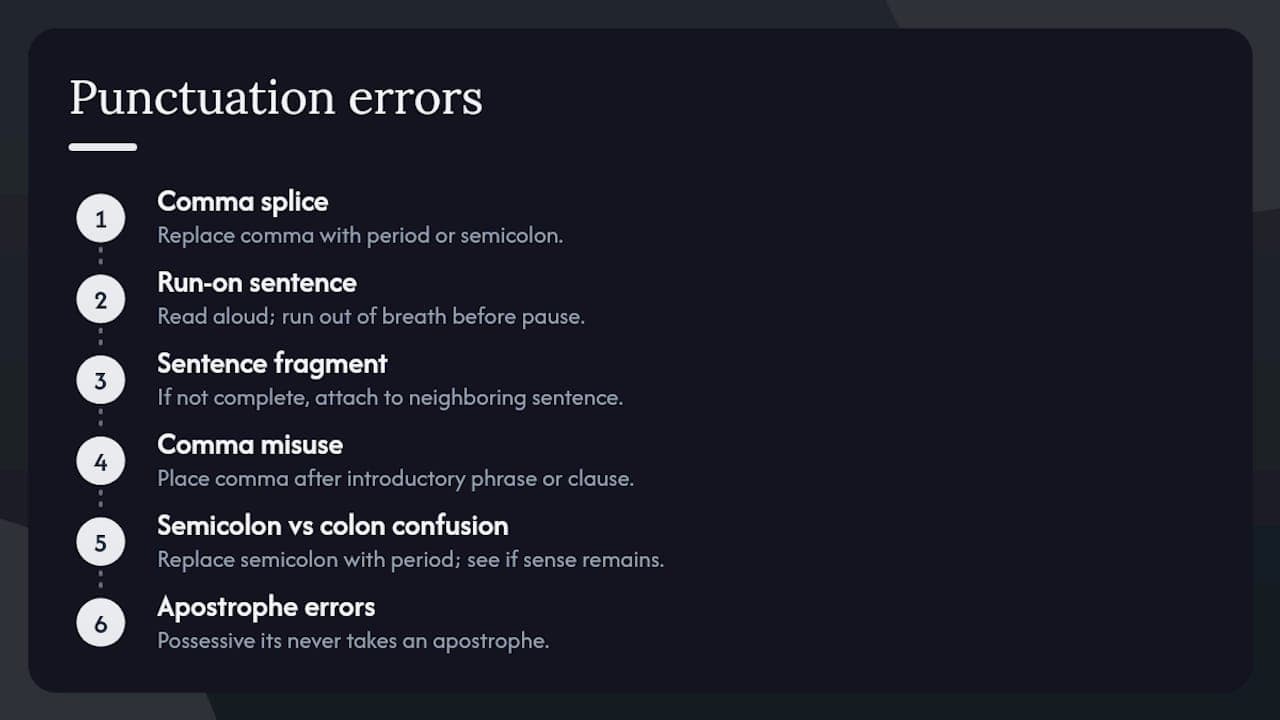
2. Run-on sentence Two independent clauses fused with no punctuation at all. ✗ She called the client he didn't answer. ✓ She called the client, but he didn't answer. Quick fix: Read aloud. If you run out of breath before a pause, you likely have a run-on.
3. Sentence fragment A phrase or dependent clause presented as a complete sentence. ✗ Because the deadline moved. ✓ The team scrambled because the deadline moved. Quick fix: Ask "Does this have a subject and a verb that expresses a complete thought?" If not, attach it to a neighboring sentence.
4. Comma misuse (missing or extra) ✗ After the meeting we reviewed the notes. ✓ After the meeting, we reviewed the notes. Quick fix: Always place a comma after an introductory phrase or clause.
5. Semicolon vs. colon confusion A semicolon joins two related independent clauses. A colon introduces a list or explanation. ✗ She had one goal: to finish; she succeeded. ✓ She had one goal: to finish. She succeeded. Quick fix: Replace the semicolon with a period. If the sentence still makes sense, the semicolon was wrong.
6. Apostrophe errors (possessive vs. contraction) ✗ The companys policy changed. ✓ The company's policy changed. ✗ Its raining outside. ✓ It's raining outside. Quick fix: If you can expand the word to "it is" or "they are," use the contraction form. Possessive "its" never takes an apostrophe.
7. Subject–verb agreement The verb must match the subject in number, not the nearest noun. ✗ The list of requirements are long. ✓ The list of requirements is long. Quick fix: Cross out every phrase between the subject and verb, then check agreement on the bare bones: "The list is."
8. Pronoun–antecedent agreement A pronoun must match its antecedent in number and gender. ✗ Every employee must submit their timesheet by Friday. (acceptable in informal use, but watch for formal contexts) ✓ All employees must submit their timesheets by Friday. Quick fix: If the antecedent is singular and gender-neutral, rewrite the sentence in the plural to avoid awkward constructions.
9. Who vs. whom "Who" is a subject; "whom" is an object. ✗ Who did you send the report to? ✓ To whom did you send the report? Quick fix: Substitute "he/she" (subject) or "him/her" (object). If "him" fits, use "whom."
10. Who vs. that Use "who" for people; use "that" for things. ✗ The writer that won the award is here. ✓ The writer who won the award is here. Quick fix: If the noun refers to a person, always use "who."
11. Your vs. you're ✗ Your going to love this. ✓ You're going to love this. Quick fix: Expand to "you are." If it reads correctly, use "you're."
12. Its vs. it's ✗ The dog wagged it's tail. ✓ The dog wagged its tail. Quick fix: Expand to "it is." If it reads correctly, use "it's." Possessive "its" needs no apostrophe.
13. Affect vs. effect "Affect" is usually a verb; "effect" is usually a noun. ✗ The weather effected our plans. ✓ The weather affected our plans. Quick fix: Try substituting "influenced." If it works, use "affected."
14. Then vs. than "Then" relates to time; "than" makes comparisons. ✗ She is taller then her brother. ✓ She is taller than her brother. Quick fix: If you're comparing two things, use "than."
15. Less vs. fewer "Fewer" applies to countable nouns; "less" applies to uncountable quantities. ✗ There are less errors in this draft. ✓ There are fewer errors in this draft. Quick fix: If you can count the items individually, use "fewer."
16. That vs. which "That" introduces a restrictive clause (no comma); "which" introduces a non-restrictive clause (preceded by a comma). ✗ The report which I submitted was approved. ✓ The report that I submitted was approved. ✓ The report, which I submitted last week, was approved. Quick fix: If removing the clause changes the meaning, use "that." If the clause is just extra information, use "which" with a comma.
17. Misplaced modifier A modifier placed too far from the word it describes. ✗ She almost drove her children to school every day. (She almost drove? Or almost every day?) ✓ She drove her children to school almost every day. Quick fix: Place the modifier directly before or after the word it modifies.
18. Dangling modifier An opening phrase that doesn't logically attach to the subject of the main clause. ✗ Running late, the meeting started without her. ✓ Running late, she arrived after the meeting had started. Quick fix: The subject of the main clause must be the thing doing the action in the opening phrase.
19. Faulty parallelism Items in a list or comparison must use the same grammatical form. ✗ She likes hiking, to swim, and reading. ✓ She likes hiking, swimming, and reading. Quick fix: Read each list item in isolation. If one uses a different verb form, rewrite it to match.
20. Inconsistent verb tense ✗ He opened the file and starts reading. ✓ He opened the file and started reading. Quick fix: Pick one tense for a passage and scan every verb to confirm it matches.
21. Active vs. passive voice Passive voice isn't wrong, but overuse buries the actor and weakens clarity. ✗ The report was written by the team. (passive, weak) ✓ The team wrote the report. (active, direct) Quick fix: Search for "was/were + past participle" constructions. Rewrite the ones where the actor matters.
22. Redundancy and wordiness ✗ She returned back to the office. ✓ She returned to the office. Quick fix: Delete any word that repeats information already stated. "Return back," "advance forward," and "end result" are common offenders.
23. Missing or wrong article (a/an/the) ✗ She is best candidate for the job. ✓ She is the best candidate for the job. Quick fix: Ask whether the noun is specific (use "the") or one of many (use "a/an"). Superlatives always take "the."
24. Preposition choice errors ✗ She is interested on learning more. ✓ She is interested in learning more. Quick fix: When in doubt, check the collocation in a dictionary. Prepositions are idiomatic and don't follow universal rules.
25. Capitalization errors ✗ She studied english at harvard university. ✓ She studied English at Harvard University. Quick fix: Capitalize proper nouns (names of people, places, organizations, languages, and specific titles) and the first word of every sentence.
Conditional sentences and the subjunctive mood trip up even experienced writers. The Northern Illinois University Writing Tutorials break these into clear categories worth bookmarking.
Conditional errors: In a real conditional, use present tense in the "if" clause and future in the result clause. ✗ If she will study, she will pass. ✓ If she studies, she will pass.
Subjunctive mood: Use the subjunctive after "if" in hypothetical or contrary-to-fact statements. ✗ If I was you, I would reconsider. ✓ If I were you, I would reconsider.
The Swansea University Academic Success guide on grammar and punctuation errors offers targeted exercises for conditionals and modifiers that are worth working through once.
Fixing errors one by one is reactive. What actually changes your writing is diagnosing your personal patterns and building a short practice plan around them. Newcastle University's Academic Skills Kit.pdf) recommends exactly this approach: keep an error log, target fundamental rules first, and use active learning rather than passive reading.
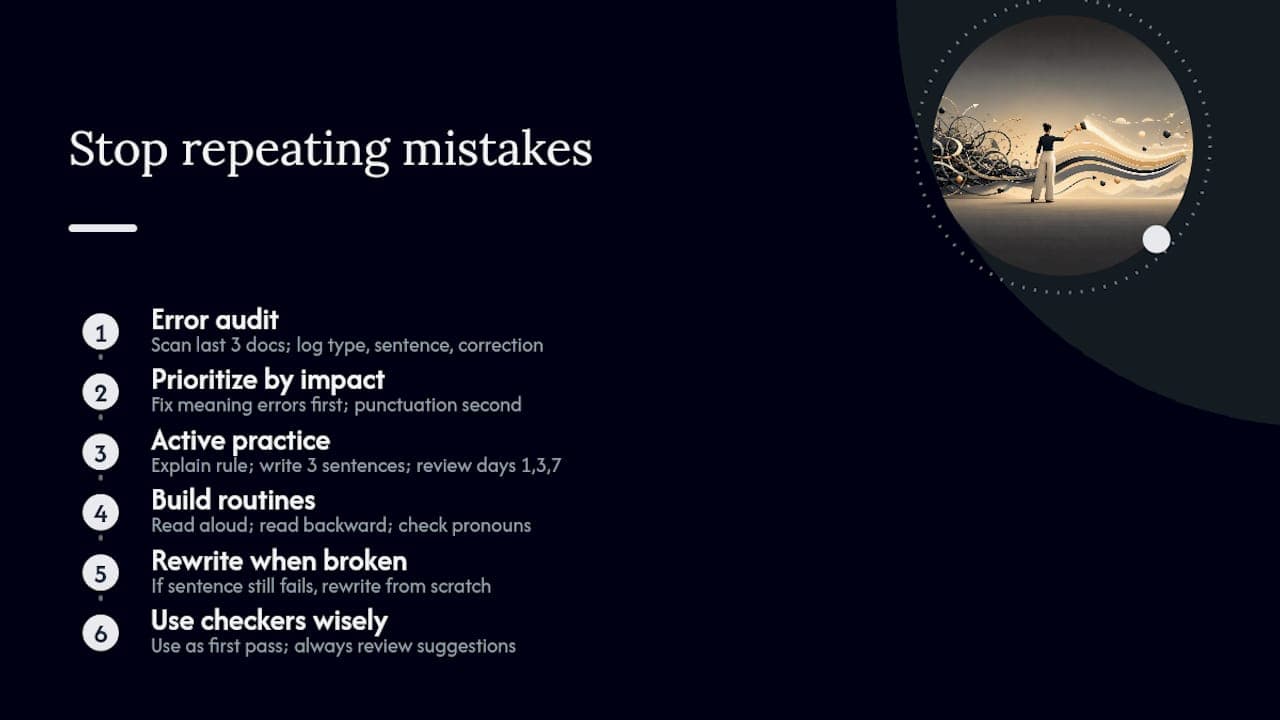
Step 1: Run a quick error audit. Pull your last three documents. Read each one looking only for errors, not content. Every time you spot a mistake, log it in a simple table: error type, the sentence where it appeared, and the corrected version. After three documents, patterns emerge fast. Most writers find two or three error types account for the majority of their mistakes.
Step 2: Prioritize by impact. Fix meaning-level errors first: fragments, run-ons, unclear pronoun references, and dangling modifiers. These confuse readers. Punctuation and style errors (comma placement, passive voice, wordiness) come second. As Newcastle University's guide for non-native speakers notes, targeting a few high-impact rules relevant to your own writing yields better results than trying to master every rule at once.
Step 3: Practice actively, not passively. Reading a grammar rule once rarely sticks. Instead, explain the rule in your own words, then write three original sentences that test it. Better still, find a colleague and teach them the rule. Teaching forces you to understand it at a level that passive reading never reaches. For stubborn errors, spaced repetition works: review the rule on day one, day three, and day seven.
Step 4: Build editing routines. Indiana University's proofreading guide recommends reading aloud and reading backward (last sentence to first) as the two most reliable techniques. Reading aloud catches rhythm problems and missing words. Reading backward disrupts your brain's tendency to autocorrect, so errors you'd normally skip become visible. For pronoun clarity, pause on every "this," "it," and "they" and ask: what noun does this replace? If the answer isn't obvious, rewrite.
When a sentence keeps breaking no matter how you patch it, stop patching. Harvard Business Review's guide on common writing errors makes the point plainly: rewriting an unclear sentence from scratch is often faster and more reliable than trying to fix a structurally broken one.
Pro Tip: Use grammar checkers as a first pass, not a final answer. Tools like Grammarly catch surface errors quickly, but they miss homonym mistakes (there/their/they're, affect/effect) and can suggest changes that alter your intended meaning. Always read the flagged sentence yourself before accepting any suggestion.
Run this checklist in order on every draft before it goes out. The sequence matters: meaning errors first, then agreement and tense, then punctuation and formatting. Indiana University's proofreading guide confirms that shifting attention from content to surface errors at the end of the process is what makes checklists effective.
Meaning and clarity (run first)
Agreement and tense (run second)
Punctuation and word choice (run third)
A note on tool failures: Spell-checkers have a well-documented blind spot for homonyms. As Excelsior OWL notes, the rise of word processors has shifted error patterns toward wrong-word mistakes precisely because auto-correct handles spelling but ignores context. Run a manual scan for the homonym pairs most common in your writing.
Workflow integration: Run this checklist after your content edit, not during it. Mixing grammar review with structural revision splits your attention and you'll miss things. One pass for content, one pass for grammar. If you're working in a team, the grammar pass belongs to whoever is not the primary author, since writers reliably miss their own errors.
For marketing writers, pairing this checklist with a content creation workflow that includes a dedicated review step prevents grammar errors from reaching publication.
No single tool covers every grammar problem. The most reliable approach pairs automated checks with authoritative references and, when needed, a human reader.
Grammar checkers (Grammarly and similar tools) These catch surface errors fast: missing commas, subject–verb agreement, repeated words, and passive voice flags. The limitation is context. Grammar checkers don't understand what you meant to say, so they sometimes flag correct sentences and miss wrong ones. Homonym errors (there/their, affect/effect) are a consistent blind spot. Use them as a first pass, then read the flagged suggestions critically before accepting.
University writing centers and reference sites These are the most reliable sources for rule clarifications and edge cases. Purdue OWL covers virtually every grammar and punctuation question with clear examples and is free. Oxford Learner's Dictionaries and Oxford's grammar resources are authoritative for word choice, collocation, and usage questions. Both are worth bookmarking for borderline cases where a grammar checker gives you no clear answer.
Style guides (Chicago Manual of Style, AP Stylebook) Style guides don't teach grammar rules so much as they resolve disputes about usage, punctuation conventions, and formatting. If you write for publication, journalism, or corporate communications, knowing which guide your outlet follows saves time on questions like comma usage in lists or how to handle numerals.
Readability checkers (Hemingway Editor) Hemingway Editor flags long, complex sentences and excessive passive voice. It won't catch grammar errors, but it identifies sentences worth simplifying, which often reveals structural problems underneath.
The table below shows where each resource category is strongest and where it falls short.
| Resource category | Best for | Typical limitation |
|---|---|---|
| Grammar checkers | Surface errors, repeated words, passive voice | Misses homonyms, context errors, meaning shifts |
| University writing centers (Purdue OWL, NIU) | Rule clarifications, examples, edge cases | No automated scanning |
| Style guides (Chicago, AP) | Usage conventions, formatting decisions | Not a grammar tutorial |
| Readability checkers (Hemingway) | Sentence complexity, passive voice density | No grammar rule enforcement |
| Oxford reference resources | Word choice, collocation, usage authority | Requires manual lookup |
For writers who produce AI-assisted content, grammar errors in AI-generated drafts follow distinct patterns. The Semihuman blog's guide on grammar mistakes in AI writing covers the most common ones and how to catch them before publication.
The grammar mistakes that damage credibility most aren't always the ones writers worry about. Comma placement and semicolon use get obsessive attention, but the errors that make readers stop and re-read a sentence are almost always structural: a pronoun with no clear antecedent, a modifier that attaches to the wrong noun, or a list where the third item breaks the pattern of the first two.
The single habit that improves most writing is reading the draft aloud, slowly, after a gap of at least an hour. Distance from the text is what makes errors visible. Your brain fills in what it expects to see when you edit immediately after writing, which is why writers miss their own mistakes so reliably.
Clarity matters more than rule compliance. Excelsior OWL frames grammar as a tool for communication, not a set of immutable laws, and that framing is right. A sentence fragment used for rhetorical punch in a piece of persuasive writing is a choice, not an error. But that choice only works when the writer knows the rule well enough to break it deliberately. Master the standard first. The flexibility comes after.
The resources below are the primary references behind this article. Each one is free and worth bookmarking for ongoing grammar questions.



Start
Humanizing
for Free!
Humanize